Student Dashboard Notion Template Academic Planner Task Organizer
Student Dashboard Notion Template Academic Planner Task Organizer
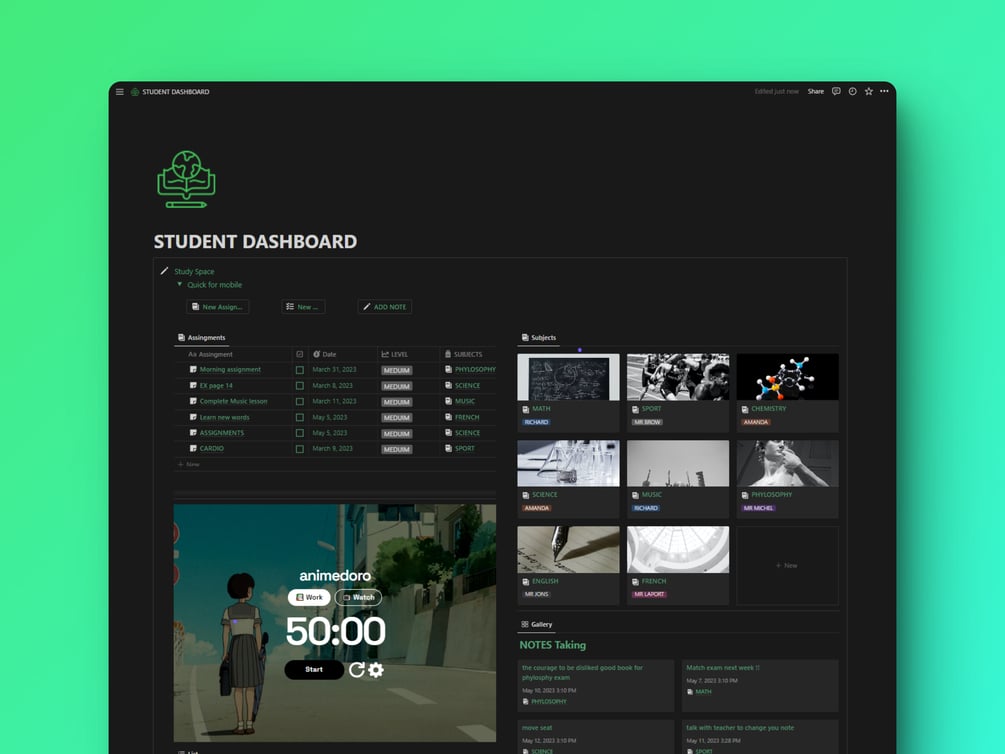
The Student Dashboard Notion template provides a centralized, customizable workspace to streamline your academic responsibilities and personal tasks throughout the semester. It enables efficient tracking of assignment deadlines, course schedules, subject-specific notes, and daily to-do lists in one structured location.
Equipped with a Japanese-themed Pomodoro productivity widget and a weekly assignment overview, this digital planner optimizes study intervals and task prioritization. It seamlessly duplicates into your Notion workspace to deliver a focused and organized academic workflow.
Key Features
| Product Type | Digital Template |
| Platform Compatibility | Notion |
| Format | Digital Download / Workspace Link |
| License | Personal Use Only |
| Theme | Japan Theme Widget |
| Key Modules | Assignments, Pomodoro Widget, Subjects, Weekly View, Personal Tasks, Notes Capture |
Highlights
- Integrated assignment and weekly deadline tracking
- Built-in Pomodoro productivity widget with a Japanese aesthetic theme
- Subject-specific organization for course schedules and lecture notes
- Combined task management for both academic coursework and personal to-do lists
- Instantly duplicable into any Notion workspace
Compatibility
Compatible with Notion across desktop, web browser, tablet, and mobile applications.
How to use
How to use Student Dashboard :
The Student Dashboard Notion template is a comprehensive tool designed to help students manage their academic workload, personal tasks, and study goals. This template includes several features, including Assignments, Pomodoro Widget (Japan Theme), Subjects, Weekly Assignments View, Personal Tasks, and Notes Capture.
The Assignments section allows for the management and tracking of academic workload. New assignments can be added, deadlines set, and progress tracked to ensure deadlines are met.
The Pomodoro Widget (Japan Theme) is a productivity tool that utilizes the Pomodoro technique to break study sessions into manageable 25-minute intervals, with short breaks in between. The Japan theme provides a calming visual aesthetic.
The Subjects section allows for the organization of courses by subject. Information such as the course name, instructor, and schedule can be added to keep track of academic schedules.
The Weekly Assignments View provides a bird's-eye view of the academic workload for the week. All assignments and their due dates are displayed in one place to assist with time management and task prioritization.
The Personal Tasks section allows for the management of personal to-do lists alongside academic workloads. Personal tasks can be added, deadlines set, and progress tracked.
The Notes Capture section allows for the capture and organization of notes for each subject. Notes can be added, tagged, and categorized by subject to keep track of study materials.
The Student Dashboard Notion template is a tool designed to assist with managing academic workloads and personal tasks through customizable features and an intuitive design.
What's included
- ASSIGNMENTS
- Pomodoro widget (JAPAN THEME)
- SUBJECTS
- WEEKLY ASSIGNMENTS VIEW
- PERSONAL TASKS
- notes capture
Frequently asked questions
|
Share